From http://www.w3schools.com (Copyright Refsnes Data)
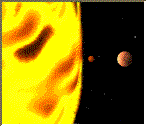
Defines a client-side image-map. An image-map is an image with clickable regions.
The name attribute is no longer supported in HTML 5
Note: The area element is always nested inside the map element. The area element defines the regions in the image map.
| Source | Output |
|---|---|
| <p>Click on one of the planets:</p>
<img src ="planets.gif" width ="145" height ="126" alt="Planets" usemap ="#planetmap" /> <map id ="planetmap"> <area shape ="rect" coords ="0,0,82,126" href ="sun.htm" target ="_blank" alt="Sun" /> <area shape ="circle" coords ="90,58,3" href ="mercur.htm" target ="_blank" alt="Mercury" /> <area shape ="circle" coords ="124,58,8" href ="venus.htm" target ="_blank" alt="Venus" /> </map> |
Click on one of the planets:
|
| Attribute | Value | Description | 4 | 5 |
|---|---|---|---|---|
| id | unique_name | Defines a unique name for the map tag | 4 | 5 |
| name | unique_name | Defines a unique name for the map tag (for backwards compability). Not supported. | 4 |
| class, contenteditable, contextmenu, dir, draggable, id, irrelevant, lang, ref, registrationmark, tabindex, template, title |
For a full description, go to Standard Attributes in HTML 5.
| onabort, onbeforeunload, onblur, onchange, onclick, oncontextmenu, ondblclick, ondrag, ondragend, ondragenter, ondragleave, ondragover, ondragstart, ondrop, onerror, onfocus, onkeydown, onkeypress, onkeyup, onload, onmessage, onmousedown, onmousemove, onmouseover, onmouseout, onmouseup, onmousewheel, onresize, onscroll, onselect, onsubmit, onunload |
For a full description, go to Event Attributes in HTML 5.
Create an image map
How to create an image map, with clickable regions. Each of the regions is a hyperlink.
From http://www.w3schools.com (Copyright Refsnes Data)